本文转载自:<span id="profileBt"><a href="https://mp.weixin.qq.com/s/DNT1U76kInTZ4FO0O2SjeA"> 硬码农二毛哥微信公众号</a></span>
在百度edgeboard fzu3上运行CIFAR10 Classification,介绍Vitis AI TensorFlow设计过程,将Python描述的网络模型运行在Xilinx DPU上。
<strong>CIFAR_10数据集</strong>
输入图片32x32x8 RGB images,完整CIFAR数据集有60k图片,将数据集进行划分,50k进行训练,10k用来验证。
<strong>DenseNet结构</strong>
DenseNet-121组成:
<center><img src="http://xilinx.eetrend.com/files/2021-09/%E5%8D%9A%E5%AE%A2/100553968-22…; alt=""></center>
注:上图针对ImageNet。
<strong>步骤</strong>
拷贝文件
<pre>cp -r /mnt/hgfs/ubuntu/DenseNetX/ ~/</pre>
下载模型
Vitis AI 1.2版本模型不能下载,使用Vitis AI1.3版本的模型,解压模型keras_model.zip,将k_model.h5拷贝到./files/build/keras_model 文件夹。
<pre>unzip keras_model.zip
cd keras_model/
cp k_model.h5 ../build/keras_model/</pre>
运行docker
<pre>cd ~/Vitis-AI
./docker_run.sh xilinx/vitis-ai:1.2.82</pre>
<center><img src="http://xilinx.eetrend.com/files/2021-09/%E5%8D%9A%E5%AE%A2/100553968-22…; alt=""></center>
设置环境变量
<pre>cd DenseNetX/
source 0_setenv.sh</pre>
模型转换
<pre>source ./2_keras2tf.sh</pre>
完成两个转换:
1、将HDF5文件转换成TensorFlow checkpiont
2、 TensorFlow checkpiont转换成 frozen graph
在第二步中用到:
<pre>freeze() {
freeze_graph \
--input_meta_graph ${TFCKPT_DIR}/${TFCKPT}.meta \
--input_checkpoint ${TFCKPT_DIR}/${TFCKPT} \
--output_graph ${FREEZE}/${FROZEN_GRAPH} \
--output_node_names ${OUTPUT_NODE} \
--input_binary true
}</pre>
在./files/build/freeze文件夹生成frozen_graph.pb文件
模型量化
在Vitis AI内可以量化模型,裁剪模型需要找xilinx。
量化将32bit float-point转换成8bit integer,不损失精度。Vitis AI支持通用神经网络 层,例如convoluton, pooling, fully connected, and batchnorm 。
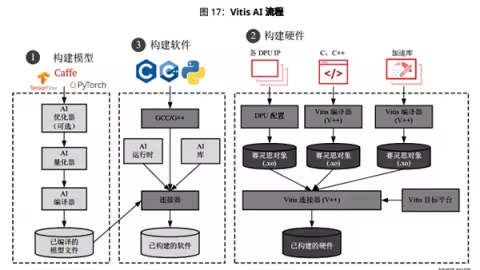
Vitis AI quantizer支持TensorFlow,Pytorch和Caffe(quantzer名字vai_q_tensorflow, vai_q_pytorch, and vai_q_caffe )
量化流程
<center><img src="http://xilinx.eetrend.com/files/2021-09/%E5%8D%9A%E5%AE%A2/100553968-22…; alt=""></center>
量化器将float-point模型作为输入(frozen GraphDef fle for TensorFlow version, prototxt and caffemodel for Caffe version ),执行预处理(batchnorm 并移除无用节点), 然后将权重/偏差和激活量化为给定位宽 。
Vitis AI量化器经过多次推理迭代,进行校准,因此需要校准数据集。
校准后,量化模型转换为DPU可部署模型(deploy_model.pb for vai_q_tensorflow or deploy.prototxt/deploy.caffemodel for vai_q_caffe )。
使用 vai_q_tensorflow 量化模型
运行以下命令以量化模型:
<pre>$vai_q_tensorflow quantize \
--input_frozen_graph frozen_graph.pb \
--input_nodes ${input_nodes} \
--input_shapes ${input_shapes} \
--output_nodes ${output_nodes} \
--input_fn input_fn \
[options]</pre>
输出量化模型
<center><img src="http://xilinx.eetrend.com/files/2021-09/%E5%8D%9A%E5%AE%A2/100553968-22…; alt=""></center>
评估量化模型
<pre>source ./5_eval_quant.sh</pre>
<center><img src="http://xilinx.eetrend.com/files/2021-09/%E5%8D%9A%E5%AE%A2/100553968-22…; alt=""></center>
编译量化模型
DPU参数包含在.dcf文件中,不同器件可能对应不同dcf,dcf文件通过如下命令生成
<pre>$ dlet -f ./system.hwh
[DLet]Generate DPU DCF file dpu-06-18-2020-12-00.dcf successfully.</pre>
system.hwh文件是在platform上创建应用时生成。
修改arch.json
arch.json默认路径
<pre>export ARCH=/opt/vitis_ai/compiler/arch/DPUCZDX8G/${BOARD}/arch.json</pre>
将arch.json拷贝到
<pre>sudo cp arch.json /opt/vitis_ai/compiler/arch/DPUCZDX8G/ZCU104/</pre>
将dpu-06-18-2020-12-00.dcf文件拷贝到DenseNetX。
运行source ./6_compile.sh
<center><img src="http://xilinx.eetrend.com/files/2021-09/%E5%8D%9A%E5%AE%A2/100553968-22…; alt=""></center>
在./files/build/compile文件夹生成dpu_densenetx_0.elf。
单板上运行应用
运行指令source ./7_make_target.sh,在./files/build/target文件夹生成如下文件
<center><img src="http://xilinx.eetrend.com/files/2021-09/%E5%8D%9A%E5%AE%A2/100553968-22…; alt=""></center>
拷贝到sd卡
<pre> scp -r ./target/ root@192.168.60.120: ~/</pre>
运行代码
<pre>python3 app_mt.py</pre>
<center><img src="http://xilinx.eetrend.com/files/2021-09/%E5%8D%9A%E5%AE%A2/100553968-22…; alt=""></center>
<center><img src="http://xilinx.eetrend.com/files/2021-09/%E5%8D%9A%E5%AE%A2/100553968-22…; alt=""></center>
<pre>python3 app_mt.py -t 5</pre>
<center><img src="http://xilinx.eetrend.com/files/2021-09/%E5%8D%9A%E5%AE%A2/100553968-22…; alt=""></center>
<center><img src="http://xilinx.eetrend.com/files/2021-09/%E5%8D%9A%E5%AE%A2/100553968-22…; alt=""></center>